
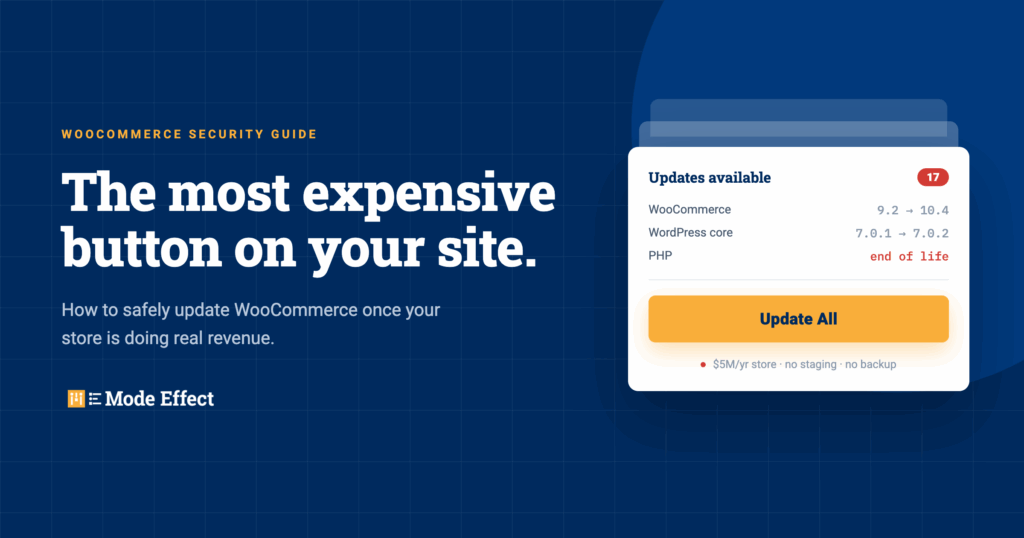
How to Safely Update WooCommerce: A Security Guide for Growing Stores
We recently had a client experience a security vulnerability that ended up costing more than $10,000 in remediation.
That’s $10,000 spent getting back to where they were before the problem happened.
It doesn’t include the internal time spent dealing with it, the projects that got pushed aside while everyone focused on the problem, or the uncomfortable questions that come up anytime someone tells you there has been a security issue with a website that handles customer data.
And unfortunately, this isn’t an unusual conversation for us anymore.
We work with WooCommerce businesses doing millions of dollars in online revenue, and one of the things that continues to surprise me is how easy it is for website updates to get pushed to the side.
I understand why it happens.
Your website is working. Orders are coming in. Marketing has campaigns running. Your team has a list of new features they want to add. Meanwhile, WordPress is sitting there telling you that WooCommerce needs an update, 17 plugins need updates, and your hosting company has started sending emails about a newer version of PHP.
So what do you do?
Okay, it’s WordPress. Can’t I just log in and click Update?
Sure.
But do you really want to test that theory on a WooCommerce store doing a few million dollars per year?
What if you’re running a subscription business processing thousands of renewals every week or month? What if an extension update changes something in checkout? What if your payment gateway suddenly has a compatibility issue? What if custom code a developer wrote three years ago doesn’t play nicely with the latest PHP version?
Now that little Update button looks a bit different.
The answer isn’t to stop updating, either.
In fact, that’s where we often see businesses get themselves into even more trouble.
They know updating could potentially break something, so they don’t update anything.
Six months turns into a year.
PHP gets further behind. Plugins get further behind. WooCommerce gets several releases behind. Maybe the developer who originally built everything isn’t even around anymore.
Eventually nobody wants to touch the site because nobody is quite sure what will happen.
That’s the ticking time bomb.
For a growing WooCommerce business, updates can’t just be something you deal with when you happen to notice a red notification in WordPress.
They need to be part of how you operate the website.
And there is a safe way to do it.
Why Ignoring WordPress Updates Has Become a Bigger Risk
Before we get too far into this, I’m not trying to paint some picture where hackers are sitting outside your virtual front door waiting for you to miss a WordPress update.
But the security environment has changed considerably.
Verizon’s 2026 Data Breach Investigations Report found that exploitation of software vulnerabilities was the leading initial access vector in the breaches it analyzed, representing 31% of breaches. Verizon also pointed to increasing automation and AI as factors making it easier to identify and exploit weaknesses faster.
That’s an important shift for smaller and mid-market companies.
Historically, businesses sometimes had this idea that serious cybersecurity problems were mostly an enterprise problem.
“We’re not Bank of America. Who is going to bother attacking us?”
The problem is that attackers don’t necessarily have to “choose” your business the way we imagine. A huge amount of this activity can be automated. If a known vulnerability exists across thousands of websites, finding websites that haven’t patched it can become part of an automated process.
And a growing ecommerce company has something attackers generally like: money moving through the system, customer information, administrative accounts, integrations, and a website that the business cannot afford to have offline for very long.
You don’t have to be Amazon to have something worth attacking.
WordPress Updates Can Move Pretty Fast
Here’s a recent example.
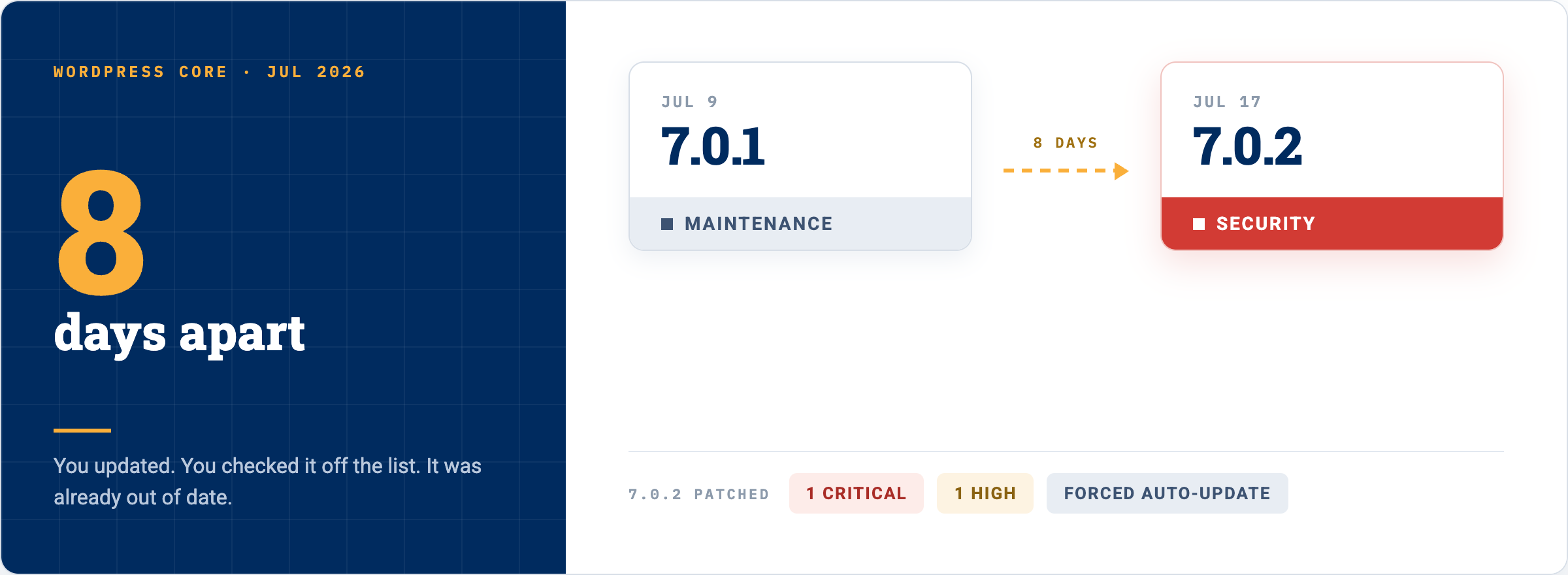
On July 9, 2026, WordPress released version 7.0.1 as a regular maintenance release.
Eight days later, WordPress released 7.0.2 specifically to address one critical and one high-severity security issue.
Because of the severity of those vulnerabilities, WordPress actually enabled forced automatic updates for affected versions and recommended that site owners update immediately.
Think about that timeline for a second.
You could have updated WordPress, checked it off your list and thought, “Great, we’re current.”
A little over a week later there was already another update that mattered from a security standpoint.
That isn’t necessarily an indictment of WordPress.
Actually, I would argue the opposite.
Software has vulnerabilities. Good software projects find them, disclose them responsibly, patch them and get those patches into the hands of users.
The problem comes when your business doesn’t have anybody paying attention.
If nobody really owns updates, you don’t know the difference between a minor maintenance release you can schedule for your normal update cycle and a security release you may need to address immediately.
Those are very different things.
Okay, But Isn’t WordPress Itself the Problem?
This usually becomes the next question.
You hear about a WordPress vulnerability or another plugin vulnerability and understandably start thinking:
Why don’t we just get off WordPress?
Maybe Shopify or some newer platform handles all of this for us.
And sure, replatforming might be the right answer for some businesses.
We’ve helped companies evaluate platform decisions, and there are absolutely circumstances where a different platform makes sense.
But you need to compare the entire cost.
What does rebuilding the website cost?
What happens to your existing integrations?
What happens to your subscriptions?
What about your SEO footprint?
Do you have custom pricing logic?
Do you have complicated fulfillment requirements?
How does your ERP connect?
What functionality are you currently getting from WooCommerce that now needs to be recreated somewhere else?
And, maybe most importantly, what does technical ownership look like after you’ve finished the replatforming project?
Moving platforms doesn’t make technology disappear.
It just changes where the responsibility sits.
WordPress is also not some dying little CMS being held together with duct tape.
It remains the dominant CMS on the web by a very wide margin, which is one of the reasons there is such a large ecosystem of developers, hosting companies, security firms, extensions and tools built around it.
So yes, moving away from WordPress could absolutely make sense.
But I wouldn’t recommend spending six figures replatforming your ecommerce operation because nobody came up with a good process for installing updates.
Those are two very different problems.
Plugins Are Usually Where Things Get Interesting
WordPress core is only part of your website.
Most WooCommerce sites we work on have a pretty substantial collection of plugins.
Payments.
Shipping.
Taxes.
Subscriptions.
Search.
Email marketing.
Product feeds.
Analytics.
SEO.
Caching.
Forms.
ERP integrations.
Then you probably have a custom plugin or two handling something specific to your business.
All of that functionality is one of the things that makes WordPress and WooCommerce so powerful.
It’s also more software that needs to be maintained.
And plugin vulnerabilities aren’t theoretical.
In May 2026, Wordfence disclosed a critical authentication bypass vulnerability affecting the Burst Statistics plugin, which had more than 200,000 active installations. Under the right conditions, an unauthenticated attacker who knew an administrator username could impersonate that administrator through WordPress’s REST API. The developer released a patch shortly after the problem was disclosed.
Around the same time, Wordfence reported arbitrary file read and SQL injection vulnerabilities affecting Avada Builder, which it estimated had roughly one million active installations.
In another 2026 case, a vulnerability in the MW WP Form plugin affected more than 200,000 installations and could potentially be used to move sensitive files including wp-config.php. The vendor patched the issue after disclosure.
The point isn’t that Burst, Avada, or any one of these developers is bad.
That’s not how software works.
The point is that vulnerabilities are going to be discovered.
When they are discovered, how quickly do you know about them and how quickly can you safely update?
That’s the real question.
“My Host Handles WordPress Updates”
This is another one we hear a lot.
And to be clear, I am a big fan of good managed WordPress hosting.
A quality host can take a lot off your plate.
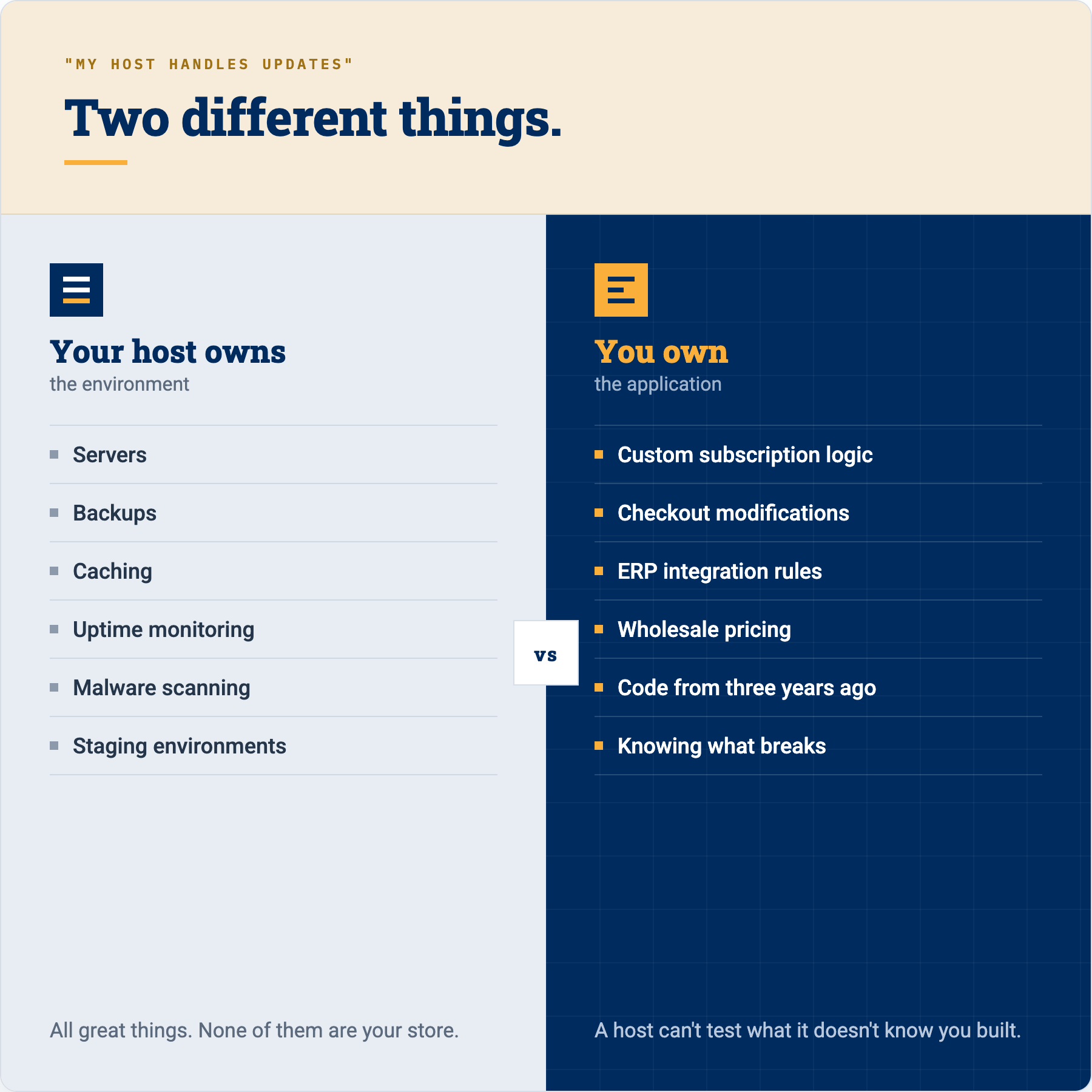
You may get backups, security tooling, server monitoring, caching, staging environments, malware protection and even automated update functionality.
All great things.
But here’s where it gets tricky.
Does your hosting company know that three years ago a developer added custom code to change the way your subscriptions renew?
Do they know why your ERP integration behaves differently for wholesale customers?
Do they know there is some custom logic around checkout that absolutely cannot break on Tuesday morning when you’ve got a promotion running?
Probably not.
Your hosting company owns the hosting environment.
They don’t necessarily own your application.
Those are not the same thing.
Even WooCommerce’s own documentation recommends backing up your website and testing updates on a staging environment before applying them to production. WooCommerce explicitly says the key principle is that updates should not be tested directly on the live store.
For a $5 million WooCommerce business, that’s just common sense.
Production is where your customers buy things.
It should not also be your QA environment.
And Then There’s PHP
This is one of the areas I think businesses overlook the most.
Everyone sees WordPress plugin updates because WordPress puts a big red number next to Plugins.
PHP is easier to forget because it lives further down in the technology stack.
But WordPress and WooCommerce run on PHP.
And PHP versions have lifecycles just like everything else.
Eventually older versions stop receiving active development. Then they stop receiving security support. Eventually plugins and WordPress itself start moving away from them.
This creates an interesting situation for older WooCommerce websites.
A company might say:
“We haven’t upgraded PHP because the website works fine.”
Okay.
But does it work fine because everything is healthy?
Or does it work fine because nobody has touched the exact combination of old PHP, old plugins and custom code that’s currently holding everything together?
Those aren’t necessarily the same thing.
And again, the answer isn’t to go into your hosting panel at 4:30 on a Friday afternoon and switch PHP versions.
Please don’t do that.
A PHP upgrade should be tested.
Put the new PHP version on staging.
Review errors and warnings.
Test checkout.
Test your payment gateways.
Test subscriptions.
Test WooCommerce scheduled actions.
Test admin workflows.
Test any custom integrations.
Look for deprecated functionality.
Then, once you know the application works correctly, schedule the production upgrade and monitor the site afterward.
The newer PHP version may give you improvements in security, compatibility and performance.
But only if the rest of your website is ready for it.
Where Is Your Custom Code?
Here’s another question I would encourage every growing WooCommerce business to ask:
Do we actually know where our custom code is?
I’m serious.
We’ve inherited sites where developers have modified plugins directly.
We’ve seen important business functionality living in a theme’s functions.php file.
We’ve seen code added years ago where nobody currently involved with the business has any idea what it does.
And eventually somebody clicks Update Plugin and that customization disappears.
Or nobody ever updates the plugin because they’re afraid the customization will disappear.
Neither is a particularly good solution.
If your website is an important business asset, your custom code should be managed like an important business asset.
That means it should live in a repository using something like Git.
You should be able to see what changed.
When it changed.
Who changed it.
And ideally why it changed.
If an update creates a problem, your developers should have enough history to figure out what happened rather than performing digital archaeology on a production server.
This becomes more important, not less important, as your business grows.
Can’t AI Just Handle This Now?
We should probably talk about this because it’s 2026.
Couldn’t you just point Claude, ChatGPT, Cursor or another AI coding tool at the website and say:
“Update all of this and make sure nothing breaks?”
AI is absolutely changing how development gets done.
We use AI.
I think development teams that refuse to learn how to use these tools are going to put themselves at a disadvantage.
AI can help review code. It can help identify deprecated functionality. It can help developers understand an error much faster. It can create tests. It can help compare versions of code. It can make an experienced developer considerably more efficient.
But there is an important difference between:
using AI inside a controlled development process
and
giving an AI agent unrestricted access to your production ecommerce site and hoping for the best.
Your WooCommerce site may contain customer information, credentials, API keys, order data, proprietary code and connections to other systems inside your business.
You need to understand what information your AI tools can access, what information is being sent to those tools, how that data is handled, and what permissions you’re giving an automated agent.
AI can make your update process better.
It doesn’t eliminate the need for an update process.
So What Should a WooCommerce Update Process Actually Look Like?
The good news after all of this doom and gloom is that this really isn’t impossible to manage.
You just need somebody to own it.
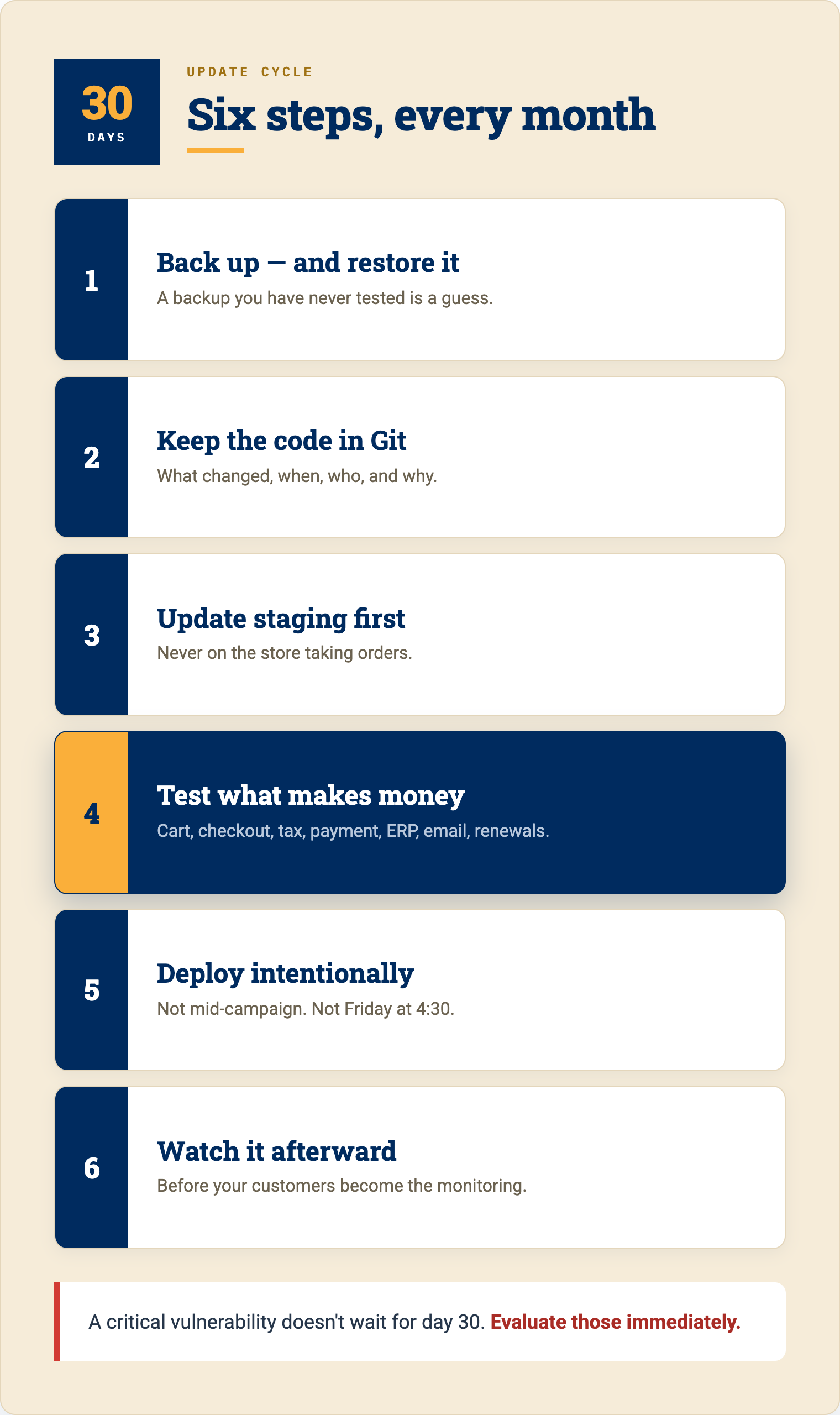
For most growing WooCommerce stores, I like having a formal update cycle at least every 30 days.
That doesn’t mean you ignore a critical security vulnerability for 29 days because your calendar reminder hasn’t come up yet.
Critical updates need to be evaluated faster.
But having a regular cycle prevents you from waking up one day and discovering that you’re three versions behind on WooCommerce, 28 plugins need updates and your version of PHP reached end of life six months ago.
Here’s roughly what that process should look like.
Start with a backup you actually know how to restore
Having a backup plugin installed is not the same as having a backup strategy.
You should know what is being backed up, how frequently it’s being backed up and how you would restore the website if something went wrong.
And yes, at some point you should actually test restoring one.
The first time you learn how your backup system works should not be while the website is down.
Keep the code in a repository
Custom code should be tracked.
This gives your team a history and gives you a much cleaner way to manage changes between development, staging and production.
Update staging first
Take the WordPress updates, WooCommerce updates, plugin updates and infrastructure changes you plan to deploy and run them somewhere that isn’t collecting money from your customers.
This sounds painfully obvious, but it is amazing how often this step gets skipped.
Test what actually makes your business money
A developer looking at the homepage and saying, “Looks good!” is not regression testing.
Can I add a product to the cart?
Can I complete checkout?
Did the tax calculate correctly?
Did the payment authorize?
Did the order reach the ERP?
Did the emails send?
Are shipping rates correct?
Can a customer log in?
If it’s a subscription site, can subscriptions renew?
What happens when a payment fails?
The testing plan should reflect your business, not just WordPress.
Deploy intentionally
Once you’ve validated everything, move the update into production in a controlled way.
For a high-volume site, think about timing.
Maybe you don’t deploy during your biggest sales period of the week.
Maybe your team needs to be available afterward.
Maybe there are releases that shouldn’t happen immediately before a major campaign.
Again, this is business operations, not just website maintenance.
Watch the site after the update
You’re not done because the deployment succeeded.
Look at your logs.
Look at checkout.
Look at payment failures.
Look at WooCommerce scheduled actions.
Look at whatever monitoring you have in place.
If something unusual starts happening, you want to know before your customers become the monitoring system.
The Real Issue Is Technical Ownership
This is ultimately what I think a lot of these conversations come down to.
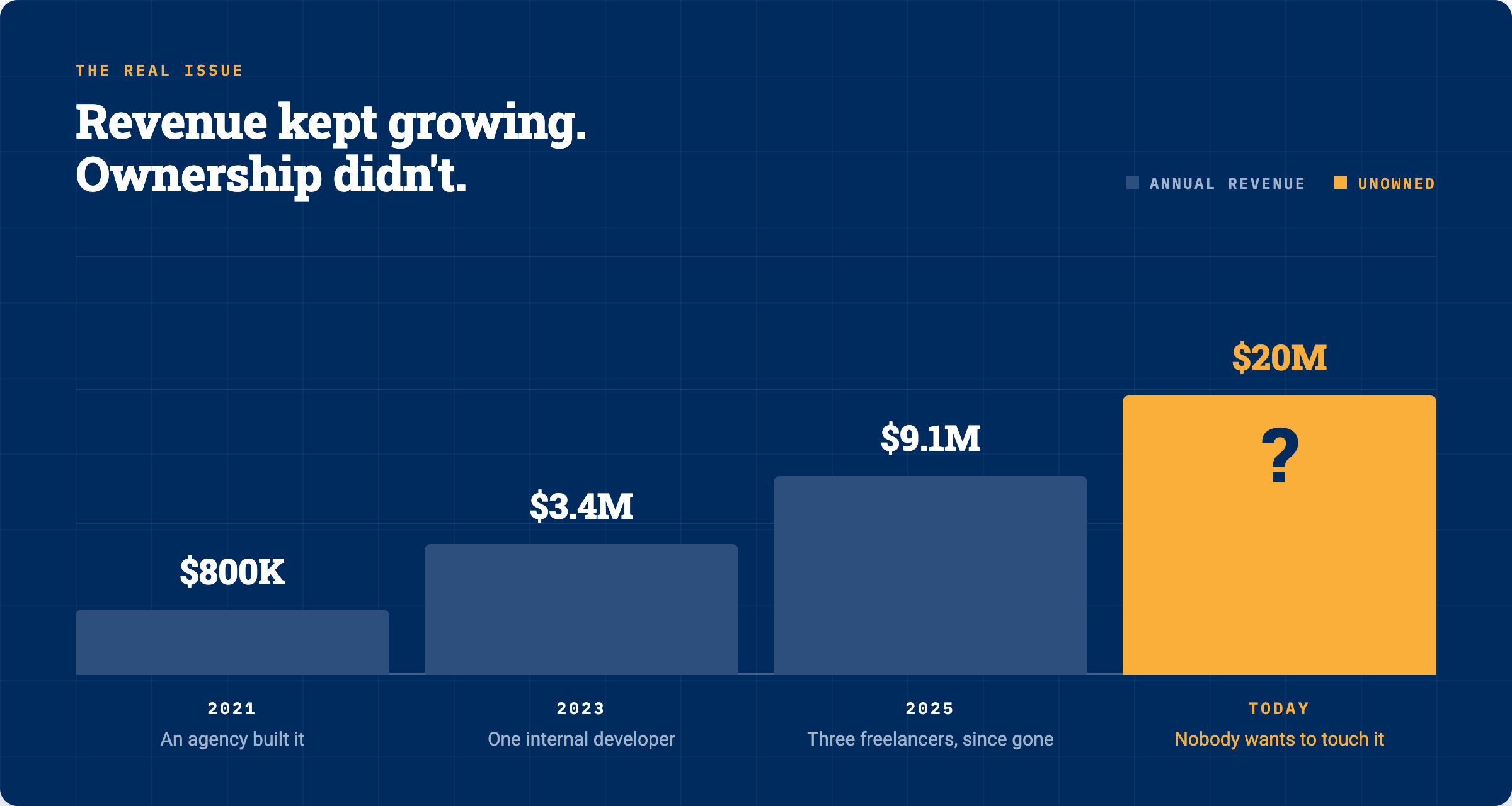
A growing company builds a WooCommerce site.
Maybe an agency built it five years ago.
Maybe an internal developer maintained it for a while.
Maybe three freelancers have worked on it since then.
The business grows.
The website becomes more important.
But nobody ever formally decides:
Who owns this technology now?
So updates happen when someone remembers.
Security happens when there’s a problem.
PHP gets upgraded when the hosting company forces the issue.
Custom code gets added wherever it’s easiest.
And then one day the website is doing $5 million or $10 million or $20 million in revenue and everybody is scared to touch it.
That’s backwards.
The more revenue your website generates, the more intentional you should become about maintaining it.
WordPress isn’t maintenance free.
WooCommerce isn’t maintenance free.
Neither is any serious ecommerce platform.
But a well-maintained WooCommerce store shouldn’t feel like you’re pulling a lever on a slot machine every time you install an update.
There should be a backup.
There should be a staging site.
There should be version control.
There should be testing.
There should be somebody who understands your customizations.
And there should be a plan if something doesn’t go the way you expected.
That is what keeping WooCommerce updated really looks like once your business starts growing.
And yes, this is also one of those areas where having the right partner can make life considerably easier.
The best partner isn’t simply logging into WordPress once a month and clicking Update All.
They understand your particular store, your custom code, your integrations and the parts of the website that matter most to your revenue.
They know what needs to be tested.
They know where the code lives.
And when something unexpected happens, they know how to get you back to where you need to be.
Because at a certain point, your WooCommerce site isn’t just a website anymore.
It’s part of how your business operates.
It should be maintained like it.
